



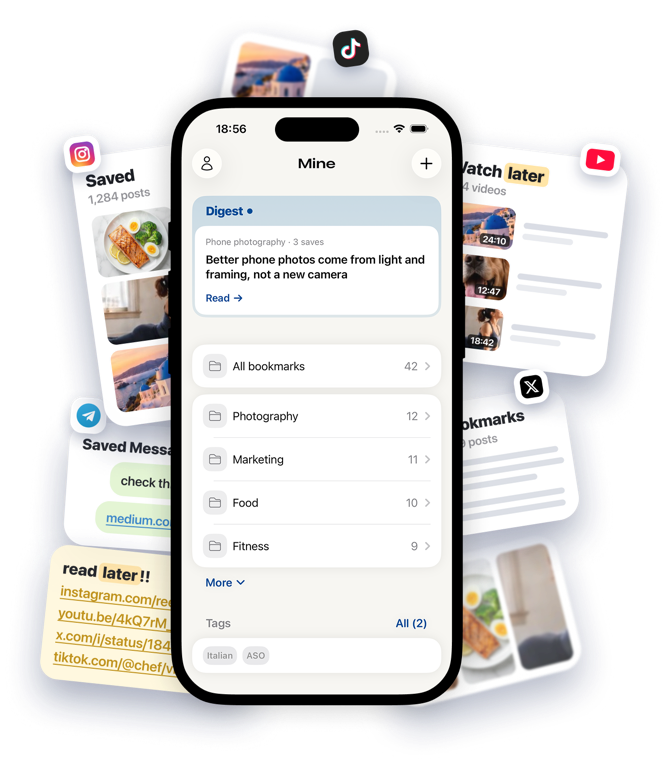
You don't forget where you saved it. You forget it exists.
Your Saved folders never bring anything back. Mine does: it picks a topic from your saves, often ones you never opened, and writes you a brief, a short read that pulls together what they say.
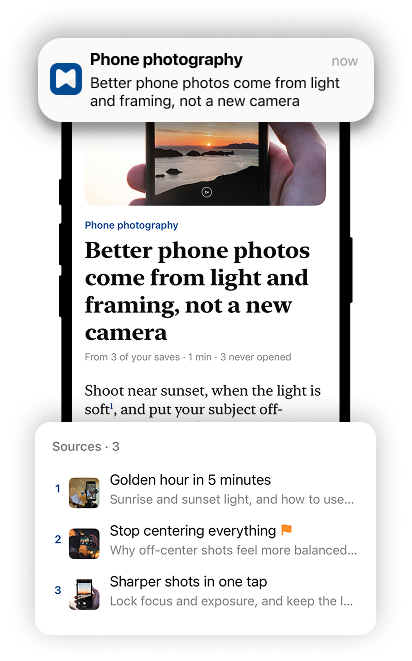
Every point is numbered. Tap a number to see what that save says, and open the original in one tap. Not your thing? Tap Not for me.
A notification tells you when it's ready, and a Home Screen widget keeps it in view.
Save from any app.
Tap Share, choose Mine, done. Posts, reels, videos, articles, places, screenshots and PDFs all land in one library.
- TikTok
- YouTube
- X
- Threads
- Telegram
- Notion
- Safari
- Google Maps
- Apple Maps
…and any other app with a Share button. Don't see Mine there? Scroll the row of apps, tap More and add it once.
Sorted into folders for you.
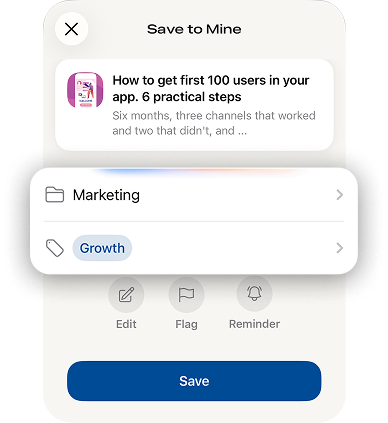
Every save gets a title you'll recognize later, even when the original was "user_04 on May 27", plus a folder and tags. You see them right in the Share sheet, before you tap Save.
Mine's AI suggests. You decide. Rename folders, change tags, move saves and build your own collections.
Summaries for long articles.
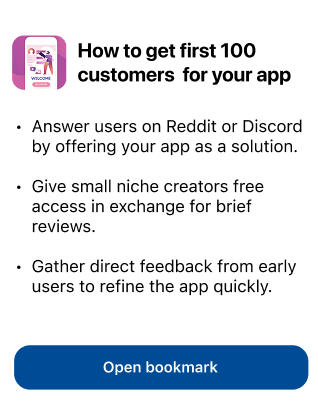
Mine sums up a long article in a few key points, so you know what's inside before you commit to reading it.
Then decide: open it now, or set a reminder for when you have the time.
Free to start
Save, organize and search as much as you like for free. Mine Pro puts the AI on every save.
Free
$0
- Save, organize and search as much as you like
- A starter allowance of AI: 10 folder and tag suggestions, 3 cleaned-up titles and 3 summaries
- 3 reminders and 10 MB of uploads
- A monthly brief
Mine Pro
$29.99/year
or $4.99/month
7-day free trial- AI titles, folders, tags and summaries on every save
- A weekly brief instead of monthly
- More reminders
- Uploads up to 50 MB each, 2 GB of storage
- Home Screen widget
Prices are in US dollars and vary by region. The free trial is on the yearly plan. Mine Pro renews automatically; cancel any time in your App Store settings.
Frequently asked
What can I save?
Links, posts, videos, images, and files — from any app. Tap Share, choose Mine, and it lands in your library, sorted automatically.
How do I save from Instagram, TikTok or Reddit?
Tap the Share button on the post or video, then choose Mine. In some apps, like Reddit or TikTok, Share sits behind a ••• or More menu. If Mine isn't in the share sheet, scroll the row of apps and tap More to add it.
Can I change what the AI picks?
Always. Every title, folder and tag is a suggestion you can edit when you save or any time later. You can rename folders, move saves and build your own collections, and a setting controls whether Mine may suggest new folders.
What is the brief?
Mine picks a topic from your saves, often ones you never opened, and writes a short read about it. Each point is numbered: tap a number to see what that save says and open the original. If a brief isn't for you, tap Not for me. Free gets a brief once a month; Mine Pro gets one every week.
What does the free version include?
You can save, organize, and search as much as you like. The AI comes with a starter allowance — 10 folder and tag suggestions, 3 cleaned-up titles, 3 summaries, 3 reminders, and 10 MB of uploads — plus a monthly brief, so you can see how it works. Mine Pro puts AI on every save and makes your brief weekly, and adds more reminders and up to 2 GB of uploads.
Is my library private?
Yes. Your saves are visible only to you, and we don't sell your data or show ads. To suggest titles, folders, tags and summaries, Mine sends details about a save to AI providers. See our Privacy Policy for exactly what's shared.
Which devices does it work on?
Mine is available for iPhone and iPad, with support for more platforms coming soon.